
OMG TLDR:
- If you’re interested in escaping Windows 11 purgatory: Try Linux
- Your games likely “just work” thanks to Valve’s incredible work: https://store.steampowered.com/linux
- KDE fucking rules
- My experience isn’t perfect, particularly with screen-sharing/game-recording. I am still troubleshooting issues there.
The Backstory
Like a lot of people, I stubbornly stayed on Windows 10 until support for it ended on October 14th, 2025. OS upgrades on Windows can be problematic, thus fresh re-installs are recommended. I’ve been using Windows operating systems since 3.1, this is a well-known fact to me. Regardless, I figured I’d try the direct upgrade anyway. Spoiler alert: Major instability issues. BSODs, driver incompatibility, massive performance degradation for GPU-intensive games (~25% FPS drop, eventually leading to full game crashes and system BSODs). Eugh, but fine, a complete reformat and reinstall from scratch was always part of my expectations. So I took a local backup, formatted my boot drive, and installed Windows 11 from a USB stick.
I reinstalled drivers, ran updates, reinstalled a few critical software packages (like Firefox), and thought my troubles were over. The only hurdles I expected were basic annoyances like turning off anti-features like OneDrive and CoPilot, and getting used to needing to hold shift when I right-click in Explorer. The first day went fine enough. Played some games, even recorded some gameplay. Then I rebooted and everything went to hell.
All graphically-intensive games started to run extremely poorly. Gameplay would last for roughly 10 minutes before resulting in a crash-to-desktop. At one point, even Discord restarted itself. Every few minutes, my computer would lock up, then play my actions in fast-forward to catch up. I eventually diagnosed this issue to Windows Update “helpfully” installing a 15-month-old NVIDIA driver. Annoying, but solvable:
I used DDU to completely shred the old driver in safe mode, then rebooted without any network to install the latest driver package available from NVIDIA’s website. This worked… for a day. Then symptoms started to crop up again, not as severe as before, but still plenty impactful.
The main issue was the massive GPU performance dip. I have an RTX 4080, not the newest card, but really nice, plenty of headroom to play most games at their highest graphical fidelity. I play a lot of Hunt: Showdown, and I try to record gameplay so I can make clips for my friends and the internet. The Windows 11 performance hit made recording gameplay impossible. It would freeze OBS, then Hunt, then my computer. Even lowering settings didn’t help.
To troubleshoot, I did everything I could think of, including (but not limited to):
- Installing several older NVIDIA drivers (complete with DDU-backed safe-mode removal)
- Deleting shader caches for impacted games
- Lowering in-game graphics settings
- Lowering OBS recording resolution and quality settings
- Checking temps with OpenHardwareMonitor
- And so much more
I spent days trying to make Windows 11 as performant as my Windows 10 install, but I just couldn’t make it work. I’m sure there’s some magic incantation somewhere (or something dumb I’ve forgotten to do), but I just couldn’t make it work. My options boiled down to:
- Deal with it, this isn’t my computer anymore, its Microsoft’s.
- Move back to Windows 10 and pay Microsoft their “protection money” through Windows 10 Extended Security Updates (ESU) program.
- This will cost $61 for the first year
- $122 for the second year
- $244 for the third year
- Move to a non-Windows platform.
As long as the “supported/recommended” OS for my system was unusable, how bad could Linux-on-the-Desktop be? Its not like I’m any worse off if things don’t work. I dug a spare M.2 drive out of my parts bin, installed it, and downloaded Debian.
My History with Linux-on-the-Desktop
I’ve been an on-again-off-again Linux-on-the-Desktop user since 2006, first experimenting with Knoppix live CDs, then moving onto a dual-boot Ubuntu 6.06 install. During the Windows Vista era, Ubuntu was my daily-driver. During the Windows 8 era, I split my time between Arch Linux and Debian. I don’t want to waste a bunch of time detailing every Linux experience I’ve had, just know that I’ve been here before and I’m not new to the world of Linux.
The last time I left Linux was for two reasons:
- Windows 10 was good.
- I was tired of streaming my games from a Windows PC in the other room.
- (Proton wasn’t viable back then for the games I played)
The First Hurdle: Bitlocker
My Windows install uses Bitlocker, Microsoft’s drive-encryption technology. This encryption tech is tempermental. If anything changes with the system, it stops booting and requires you to put in a very long drive-recovery-code (essentially a boot password). Apparently this happened because I was chain-loading Grub→Windows and Bitlocker didn’t like that. After suspending and un-suspending bitlocker protection and never chain-loading Grub into the Windows boot loader, this problem went away.
I actually thought this would be a bigger problem, but I’m just not booting into Windows for much of anything anymore.
What Works
The Basics
The days of Linux installs not recognizing hardware seems to be over (at least for me). Everything on my system just worked out of the box. Adding NVIDIA drivers wasn’t as easy as Ubuntu or Linux Mint makes it, but a brief glance at the Debian Wiki let me get some updated knowledge and walked me through the install process.
Keep in mind, this isn’t a complaint, this is praise. I chose Debian because I wanted more control than Ubuntu and less fiddling than Arch. This is the perfect amount of fiddling for me.
Gaming
Thanks to Steam and Proton, most games just work (honesty, every game I’ve tried worked perfectly, I just find it hard to claim all games work). Even non-Steam games can be added to your library and use Proton (I run the GOG version of Cyberpunk 2077 this way). Very little fiddling needed. As a bonus, most games come with a 10-20 FPS increase running under Proton.
Back in the day, if you wanted to see if a game worked under Wine, it was a lot of searching the internet in deep Linux forums, compiling wine hacks yourself, and trying shit to see if it worked. Rinse and repeat. Today, we’re a bit more civilized, we crowdsource that shit with ProtonDB. Wanna know if your game works on Linux? Go there, search, find out. If there are launch flags or other tweaks to make, they’ll be listed.
Getting mods to work with my GOG Cyberpunk install needed one of these launch options. After that, works just as good as Windows (but with a bonus slight FPS increase).
Accessing Bitlocker-encrypted Drives
I was very surprised buy this. Apparently you can just click to mount Bitlocker drives in modern Linux systems. It just works:
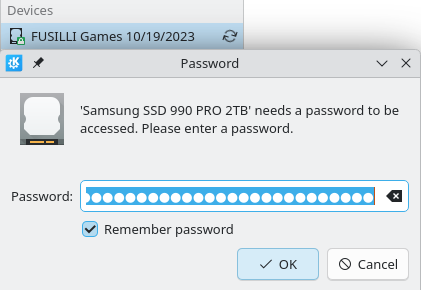
Just use your BitLocker Recovery Key as the password (dashes-included) and the drive unlocks.
What Kinda Works
Sunshine Streaming
I remote into my desktop probably 400 times per day (slight exaggeration). I have an iPad that I use as a thin-client to access my desktop. It effectively means I can walk around the house and still use my PC. In the middle of a 6-hour gaming retrospective on YouTube and don’t want to give up the indomitable uBlock Origin? Just remote in and walk away from your desk without missing a beat.
Sunshine makes this super easy. On Windows.
On Linux, there are some troublesome issues:
- The default Debian package does not install the systemd-user service file, so auto-starting Sunshine on graphical-session login simply does not work.
- If you’ve configured your monitors to sleep after a time, Sunshine does not wake them up (it does on Windows, though). Instead, you get a connection error.
To solve the first issue, I wrote a cheeky bash script:
#!/bin/bash

/usr/bin/sleep 10
/usr/bin/sunshine
This waits until my KDE session is good and ready, then launches Sunshine. The “proper” way to solve this problem is just to make the systemd service file is installed, but this was fast and it worked. I added this to my KDE autostart list and its been working perfectly.
To solve the second problem, I wrote a tiny service called Sunrise that watches for “monitor is missing” errors, then wakes the monitor and restarts Sunshine.
https://codeberg.org/SamuraiLink3/sunrise
After that brief journey into software development, Sunshine is working well enough to function as a daily driver.
What Doesn’t Work
Screen Sharing/Recording
It ain’t all perfect though. Sharing full-screen apps on Discord via Wayland results in the stream becoming frame-limited and low-resolution after a few minutes. Recording full screen apps on OBS results in the game starting to screen-tear and the frame rate getting very choppy. Its pretty disorienting to look at. There are some troubleshooting steps I have yet to try, particularly looking into compiling OBS myself and using obs-vkcapture. Something to dig into for the future.
That said, Windows 11 can’t game+record at the same time, so I’m not any worse off.
Thoughts on KDE Plasma
I was always a Gnome user. I really appreciated the “simple by default, but very customizable” Gnome 2. Gnome 3 was a disappointment, but with enough tweaks, config files, fragile extensions, and tears, I was able to make it work. This time I decided to give KDE Plasma a full try.
I always shied away from KDE because it was “too big”. Too much by default. I wanted to start simple and add complication, not start with complication and pare it down until it got simpler. Turns out, my past fears are just unfounded with modern KDE. KDE is perfectly usable and simple out of the box. The experience feels a lot like Gnome 2. If you just want a default system, KDE works perfectly, if you want to customize the hell out of it: KDE still works perfectly.
If you hate how Windows 11 fucked with your right-click menu, I’ve got great news: KDE lets you customize it, easily. No shell scripts required, just go into the “configure” menu and its there:
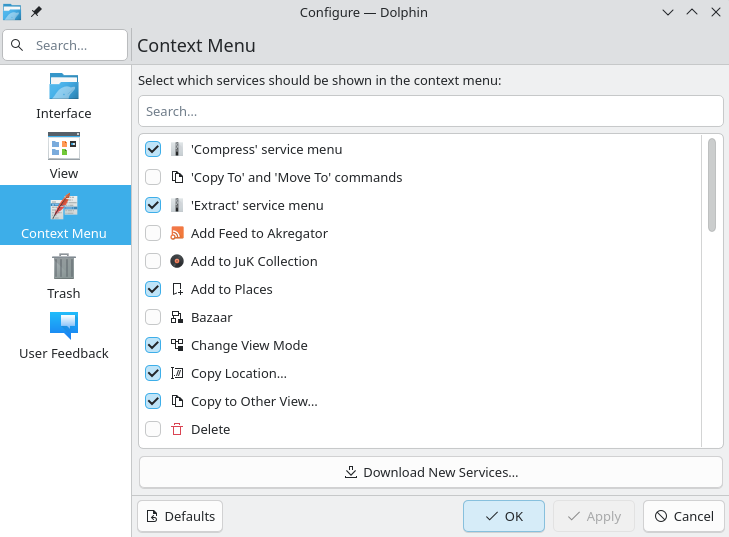
Fucking beautiful.
Issues Endemic to Linux
I can’t stop tinkering. Its a problem. It takes a concentrated effort for me to not tweak and optimize and customize my setup instead of just using my setup. When I was on Windows, this was easy: The computer wasn’t really mine, it was Microsoft’s.
There are so many “black boxes” on Windows systems. You can search around the internet for solutions, maybe do some debugging, maybe dive into eventvwr, but with some problems, eventually you just hit a wall and hope the problem goes away.
Linux doesn’t have this problem (for the most part, proprietary software still exists over here). Just about any problem has logs, debugging information, and a small army of turbo-nerd-tinkerers who ran into the exact same problem you did. The power and possibilities are intoxicating.
The main reason I left Arch for Debian in the first place was because I was tired of getting sucked into tinkering with my computer when I should have been using my computer. This is still a problem with me and Debian, just a bit less since so much works out of the box.
Just know, if you’re the same kind of tech person I am, you may need to be extra-vigilant about intentional usage.
To Summarize
While my most recent experience hasn’t been perfect (and it never is), what’s here is more than good-enough, and certainly better than my Windows 11 experience. I left Linux for gaming, and now that gaming is on Linux, I don’t see a lot of reasons to go back to Windows.
 Interact with this post on Bluesky: